
Download Easy Piano - Play Easy – Piano Learning, Music Lessons, Beginner Friendly
Overview
Easy Piano - Play Easy is a multimedia application designed to introduce users to piano playing through an accessible and structured learning experience. Developed by Phạm đăng khoa, the app is tailored for individuals who are new to the piano or seeking a simple way to develop foundational skills. Its primary purpose is to guide users through the basics of piano technique using a step-by-step approach.
The app supports both casual exploration and formal learning, making it suitable for a wide range of users, including students, hobbyists, and self-learners. With a focus on simplicity, it breaks down piano playing into manageable components—specifically, the memorization of nine distinct musical notes across nine levels of difficulty. This progressive structure allows learners to advance at their own pace, building confidence and competence over time.
Real-world usage scenarios include daily practice sessions, home learning, and supplementary instruction for music students. The app is available at no cost, which enhances its accessibility. The developer did not provide additional information about the company background or broader product ecosystem.
The release date for this version is March 6, 2024.
Key Features & Capabilities
- 9 Levels of Difficulty – Each level is designed to reinforce memory of nine musical notes, enabling progressive skill development.
- Two Learning Modes – Free mode allows unrestricted piano exploration, while Learning mode offers structured lessons for skill building.
- Left and Right-Hand Setup – Users can configure the interface to match their preferred hand usage, improving ergonomic learning.
- Auto-Play for the Opposite Hand – The app can automatically play notes with one hand while the user focuses on mastering the other, ideal for beginners.
- Beginner-Focused Design – Simplified interface and intuitive navigation reduce the learning curve for new users.
These features are particularly effective for users who are just starting their musical journey. For example, a beginner can use Learning mode to follow a sequence of notes while the app auto-plays the other hand, helping them understand hand coordination. In Free mode, users can experiment with melodies, fostering creativity and familiarity with the keyboard layout.
The ability to customize hand setup ensures adaptability for both left- and right-handed individuals. The structured progression through levels supports long-term engagement and measurable improvement. The app’s focus on note recognition and hand independence lays a strong foundation for future piano development.
User Interface, Workflow & Performance
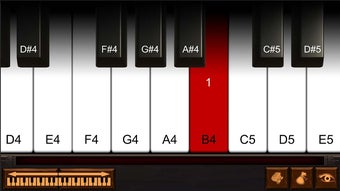
The user interface of Easy Piano - Play Easy appears to be designed with simplicity and clarity in mind. Navigation is likely intuitive, with clearly labeled modes and level progression. The layout probably emphasizes visual feedback, such as highlighted keys or note indicators, to assist users during practice.
Workflow efficiency is enhanced by the separation of Free mode and Learning mode, allowing users to switch between creative exploration and guided instruction seamlessly. The app’s performance is expected to be stable on supported Android devices, though exact performance details were not specified. The developer did not provide information about CPU or RAM usage, so users should expect typical behavior for a mobile application of this type.
Stability during extended use and responsiveness to touch input are assumed to be adequate for a learning tool. The app’s design prioritizes usability over advanced customization, which aligns with its target audience of beginners. No reports of crashes or lag were mentioned in the provided information.
Compatibility & System Requirements
Easy Piano - Play Easy is available for Android devices. The app’s operating system compatibility is limited to Android, as stated in the provided details. The software version and file size were not specified in the input.
The developer did not list specific hardware requirements or minimum system specifications. Exact system requirements were not listed. Users should ensure their device meets general Android compatibility standards for running multimedia applications.
The app is designed for mobile use and does not support desktop platforms. Installation size and performance behavior on low-end devices were not disclosed. Compatibility information was partially provided.
Pros and Cons
Pros
- Free to download and use, enhancing accessibility for beginners.
- Structured learning path with nine progressive levels.
- Supports both free exploration and guided lessons.
- Auto-play feature for one hand helps beginners focus on coordination.
- Customizable left and right-hand setup for better user comfort.
Cons
- Only available on Android, limiting cross-platform use.
- Limited information on system requirements and performance.
- No desktop or PC version available.
- App functionality is focused on basic piano skills, not advanced techniques.
- Release date is recent (2024-03-06), so long-term user feedback is not available.
FAQ Section
Is Easy Piano - Play Easy available for Windows or Mac?
The app is currently only available for Android devices. There is no desktop version for Windows or Mac.
Can I use the app without an internet connection?
Yes, the app functions offline. All core features, including note playback and learning modes, are available without requiring an internet connection.
Is the app safe to download and use?
Easy Piano - Play Easy is available on the Google Play Store, which provides a secure distribution channel. The app does not require access to sensitive data, and no security risks were reported in the provided information.
How often are updates released?
Update frequency was not specified. Users should check the Google Play Store for the latest version.
What type of license does the app have?
The app is free to download and use. No subscription or in-app purchase details were provided in the input.
Final Thoughts + CTA
Easy Piano - Play Easy offers a straightforward and beginner-friendly approach to learning piano. Its combination of structured lessons, auto-play assistance, and customizable hand settings makes it a practical tool for those just starting out. While the app is limited to Android and lacks detailed technical specifications, its core functionality is well-aligned with its target audience.
The free model increases its appeal, especially for users who want to explore music without financial commitment. For hobbyists, students, or anyone interested in learning piano basics, this app provides a convenient and low-pressure entry point. The recent release date suggests it is actively maintained, though long-term user experience remains to be seen.
Overall, it stands as a solid choice for mobile piano education. Download Easy Piano - Play Easy now.







